How to Turn Meeting Notes Into Action Items With AI
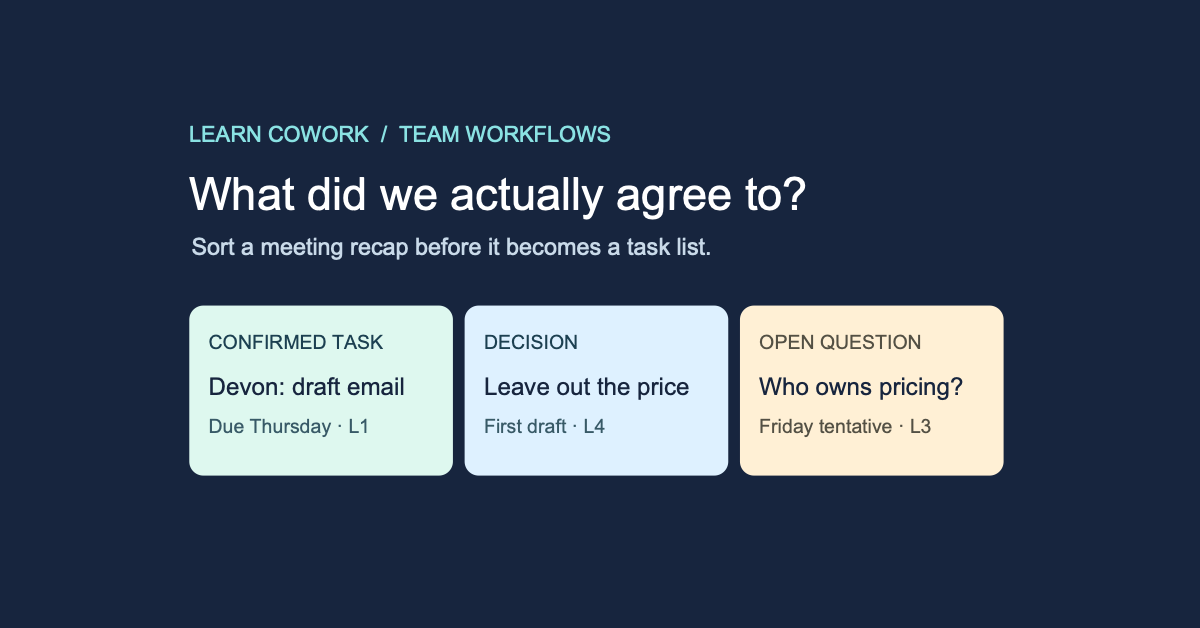
Imagine a meeting that ends with “Friday should work.” An hour later, the AI recap says Devon is delivering the whole launch on Friday. Devon had agreed to draft one email. Friday was when the team hoped to get a price decision. Send that recap as written and you've given someone a deadline they never accepted.
To turn meeting notes into action items, ask the AI for the task, owner, due date and exact line that supports each one. Keep decisions and open questions separate. Give unclear commitments a place to go so nobody has to guess just to fill a row.
Try it with a five-line launch meeting
This fictional meeting is on Monday, November 16. A small team is preparing a product launch email. The notes are already approved for use in the team's AI tool.
- L1, Devon: “I'll put the first launch email draft in the shared folder by Thursday, November 19.”
- L2, Mina: “I can check the draft once the price is confirmed.”
- L3, Luis: “Friday might work for deciding the price, but I need to ask Finance.”
- L4, Mina: “Let's leave the price out of the first draft.” Devon: “Agreed.”
- L5, Devon: “Could somebody update the product page, too?”
Read the condition before you assign
Notice the two phrases that are easy to miss: “once the price is confirmed” and “might work.” One is a condition. The other is a tentative date for a different decision. Keep both next to the words they qualify.
Give the AI somewhere to put uncertainty
Here's the prompt I'd use on the notes above:
“Draft an internal follow-up from these numbered notes. Return three groups: agreed tasks, decisions, and questions or conditional offers. For each agreed task, give the deliverable, the person who accepted it, the due date only if stated, and the number and exact words of the supporting line. For the other two groups, cite the line and keep the original condition or uncertainty. If an owner or date is unclear, write ‘Needs confirmation.’ Don't silently resolve conflicting statements. Draft only; do not assign, send or update anything.”
If you're working from a transcript, include the meeting date and preserve speaker labels and timestamps. Use the smallest approved excerpt that captures the decision. If a name in the transcript looks wrong, use the notes or ask the participants to confirm it before making an assignment.
Compare the output with what people agreed to
Here is the expected result, with a few rows shortened for readability. The full record for L1 would also retain Devon’s exact words: “I'll put the first launch email draft in the shared folder by Thursday, November 19.”
- Agreed task, L1: Devon puts the first launch email draft in the shared folder by Thursday, November 19. Done means the draft is available for review. It doesn't mean the email has been sent.
- Decision, L4: Leave the price out of the first draft. Carry that into Devon's task description.
- Conditional offer, L2: Mina can check the draft after the price is confirmed. Review date needs confirmation.
- Open question, L3: Who owns the price decision, and when will it be made? Friday was suggested. Luis mentioned asking Finance, but didn't say when or commit to setting the price.
- Open question, L5: Who will update the product page, and when? Nobody accepted that job in these notes.
Catch a date borrowed from another line
If the draft says “Mina reviews Friday,” go back to L2 and L3. The model may have stitched a person from one line to a date from another. Good formatting can make that error look more convincing. Read the source line and the sentence around it before clearing a name or date.
Write the follow-up people can check
For this meeting, the update could be: “Devon will post the first email draft by Thursday, November 19, with the price left out. Mina can review after pricing is confirmed. Who can confirm the pricing decision and take ownership of the product page update?”
Now the responders know where to help. Once someone accepts the product page task, add the confirmation to the notes and give it its own entry. If a confirmed task has no date, leave it blank or agree on a checkpoint with its owner. A due date you choose later belongs in the follow-up as a new proposal, with room for the other person to respond.
Microsoft’s guidance for AI-generated Teams meeting notes also calls for checking the output. The same habit works with typed notes from any tool. Use only notes your organization allows you to handle in that AI workspace. Keep the source lines in the internal review record and share only the details the recipients need.
At your next meeting, try this on five to ten lines. Highlight one real commitment and one sentence that almost sounds like one. See whether the AI separates them, correct any drift and move just the verified task into your team's tracker. A good recap gets someone started without making them ask, “Wait, did I agree to that?”
For the next step, document the workflow so a teammate can run it.
Key takeaways
- Ask for the line that supports every assignment.
- Keep conditional offers and open questions out of the confirmed task list.
- Share the reviewed follow-up and put only confirmed tasks into the tracker.
Frequently asked questions

Evan is a 25-year digital marketing veteran, founder of Experience Advertising, and a daily Claude Cowork and Codex user who trains business teams to use agentic AI fluently in their real workflows.
More about EvanPractice on a workflow your team uses
Bring an approved example and learn to draft, check and hand off the result as a team.
Explore team AI training